OrangePi (local)
Orange Pi 5 – 8 cores, 8GB RAM 500GB SSD – to try out things in the office. Installed Debian, seems fine so far. Here is how to Install cinnamon on Debian.
Hermes Agent
Installed Hermes Agent—set up for multiple accounts with their own data sets. Syncthing will keep its files up to date with the other local machines via the Raspberry Pi.
Boot From NVME SSD
Lots of people online (when you search for “orange pi unable to see NVME SSD”) insisting that you must have a SATA SSD instead, but get through all that, and these instructions worked ok for me.
Orange Pi 5 NVMe/SATA SSD Boot Guide
And here is a PDF just in case.
But as usual it turned out to be not so easy. Eventually this page instructions worked, but the first one has a better way to clone the system from the SD to the SSD.
Here’s a pdf again just in case.
If you get messages about graphics drivers,
sudo add-apt-repository ppa:liujianfeng1994/panfork-mesa
sudo add-apt-repository ppa:liujianfeng1994/rockchip-multimedia
sudo apt update
sudo apt dist-upgrade
sudo apt install mali-g610-firmware rockchip-multimedia-config
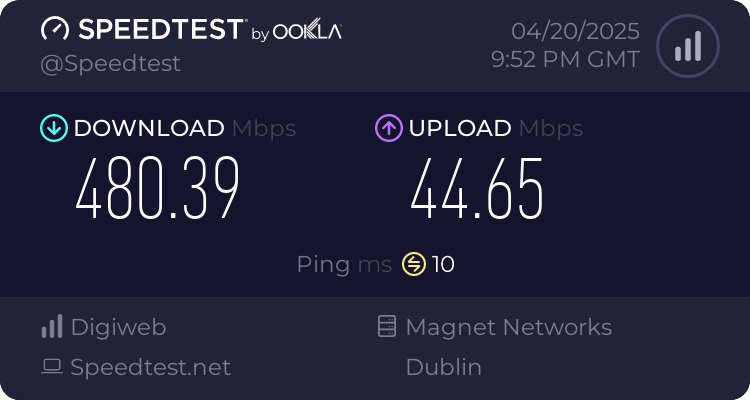
Speedtest
The upload speed is crap because its on a domestic account and us zombies are supposed to be just consuming moronic TV etc., we’re not supposed to be trying to do anything.
Below Is Redundant
Cockpit
Up and running:
Cockpit
Webmin
Up and running:
https://192.168.178.36:10000/
andy/ss
Can add virtualmin and make it a web hosting control panel.
Earn.fm
Running in a Docker container. See the txt file.
Also, there’s a Nostr node running, but I can’t get through the router.
(2025-05-15)
andy@orangepi5:~$ sudo docker ps
CONTAINER ID   IMAGE                         COMMAND                  CREATED          STATUS                            PORTS      NAMES
613ef761d83a   containrrr/watchtower         "/watchtower --clean…"   11 minutes ago   Up 11 minutes (healthy)           8080/tcp   watchtower
bffc99c3ad05   earnfm/earnfm-client:latest   "/app/earnfm_example"    11 minutes ago   Up 11 minutes                                earnfm-client
f915540b3b59   scsibug/nostr-rs-relay        "/bin/sh -c './nostr…"   3 weeks ago      Restarting (255) 48 seconds ago              public-relay
Maybe can run proxmox.
Proxmox ARM running on the Orange Pi 5 with NVMe!
by u/TheWingsOfWar in Proxmox
includes how to boot from NVME SSD
It should be similar to Raspberry Pi
There’s an installtion script for Raspberry Pi here. It might work.